DHCP Basics
Understanding how devices automatically obtain network configurations.
Table of contents
- What is DHCP?
- The DHCP Process
- What DHCP Provides
- Hands-On DHCP Commands
- Common DHCP Issues
- DHCP Configuration
- Best Practices
- Practical Applications
- Next Steps
- Additional Resources
What is DHCP?
DHCP (Dynamic Host Configuration Protocol) automatically provides devices with the network configuration they need to connect to a network. Think of it like a hotel’s front desk that assigns room numbers to guests - DHCP assigns IP addresses to devices.
📝 Key Concept
Without DHCP, you'd need to manually configure network settings for every device on your network.
The DHCP Process
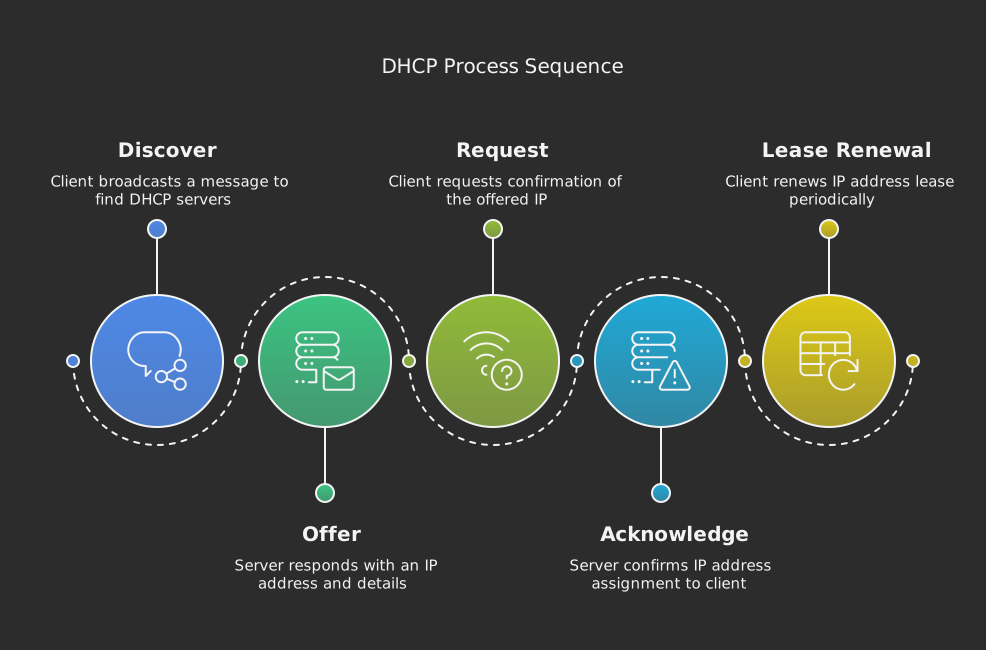
1. DHCP Discovery (DISCOVER)
- New device broadcasts “Hello, I need an IP address!”
- Like a guest arriving at a hotel asking for a room
2. DHCP Offer (OFFER)
- DHCP server responds with available IP address
- Similar to the front desk offering an available room
3. DHCP Request (REQUEST)
- Device accepts the offered IP address
- Like the guest accepting the room assignment
4. DHCP Acknowledgment (ACK)
- Server confirms and finalizes the assignment
- Equivalent to getting your room key
❗ DHCP Lease Time
IP addresses are assigned for a specific period (lease time). Devices must renew their lease before it expires to keep the same IP address.
What DHCP Provides
DHCP configures multiple network settings:
| Setting | Purpose | Example |
|---|---|---|
| IP Address | Device identifier on network | 192.168.1.100 |
| Subnet Mask | Defines network range | 255.255.255.0 |
| Default Gateway | Router address | 192.168.1.1 |
| DNS Servers | Name resolution servers | 8.8.8.8, 8.8.4.4 |
| Lease Time | How long to keep settings | 24 hours |
Hands-On DHCP Commands
Viewing DHCP Information
# View all network configuration (Windows)
ipconfig /all

# Release current IP address
ipconfig /release

# Request new IP address
ipconfig /renew
💡 Practice Exercise
Try releasing and renewing your IP address to see DHCP in action. Note: This will temporarily disconnect you from the network.
Common DHCP Issues
1. DHCP-Related Problems
- “No Valid IP Configuration”
- Limited or no network access
- IP address conflicts
- DHCP server not responding
2. Troubleshooting Steps
# Release current IP
ipconfig /release

# Obtain new IP
ipconfig /renew

# View DHCP information
ipconfig /all
3. Solutions
- Restart DHCP client service
- Check network cable connection
- Verify DHCP server is running
- Reset network adapter
DHCP Configuration
DHCP Server Settings
- IP Address Range (Pool)
- Lease Duration
- Reserved Addresses
- Network Configuration
DHCP Options
- Option 3: Default Gateway
- Option 6: DNS Servers
- Option 15: Domain Name
- Option 51: Lease Time
⚠️ Network Security
DHCP can be vulnerable to rogue DHCP servers. Always ensure you're getting configuration from legitimate DHCP servers.
Best Practices
- DHCP Server Configuration
- Set appropriate lease times
- Reserve IPs for critical devices
- Monitor DHCP pool usage
- Configure failover if possible
- Client Configuration
- Enable DHCP by default
- Use automatic DNS settings
- Monitor lease renewal
- Security Considerations
- Implement DHCP snooping
- Use DHCP authentication
- Monitor for rogue DHCP servers
Practical Applications
Home Networks
- Automatic configuration of:
- Personal computers
- Smartphones
- Smart home devices
- Gaming consoles
Enterprise Networks
- Managing thousands of devices
- VLAN configuration
- Quality of Service (QoS) settings
- Network access control
Next Steps
Continue to Email Systems to learn how email travels across the internet using DNS and other protocols.
Additional Resources
- DHCP troubleshooting guide
- Network configuration commands
- Command Cheatsheet