Networking: DNS & DHCP
Understanding how devices obtain IP addresses and how domain names are resolved.
Table of contents
- Introduction to Network Services
- DNS Overview
- DHCP Overview
- Why These Services Matter
- Hands-On Practice
- Common Issues and Solutions
- Next Steps
- Additional Resources
Introduction to Network Services
Modern networks rely on two crucial services to function properly:
- DNS (Domain Name System): Converts human-readable domain names to IP addresses
- DHCP (Dynamic Host Configuration Protocol): Automatically assigns network configuration to devices
❗ Key Concept
Think of DNS as the internet's phone book and DHCP as the hotel front desk that assigns room numbers to guests.
DNS Overview

DNS is responsible for:
- Converting domain names (like google.com) to IP addresses
- Storing and distributing website location information
- Enabling global access to websites using memorable names
DHCP Overview
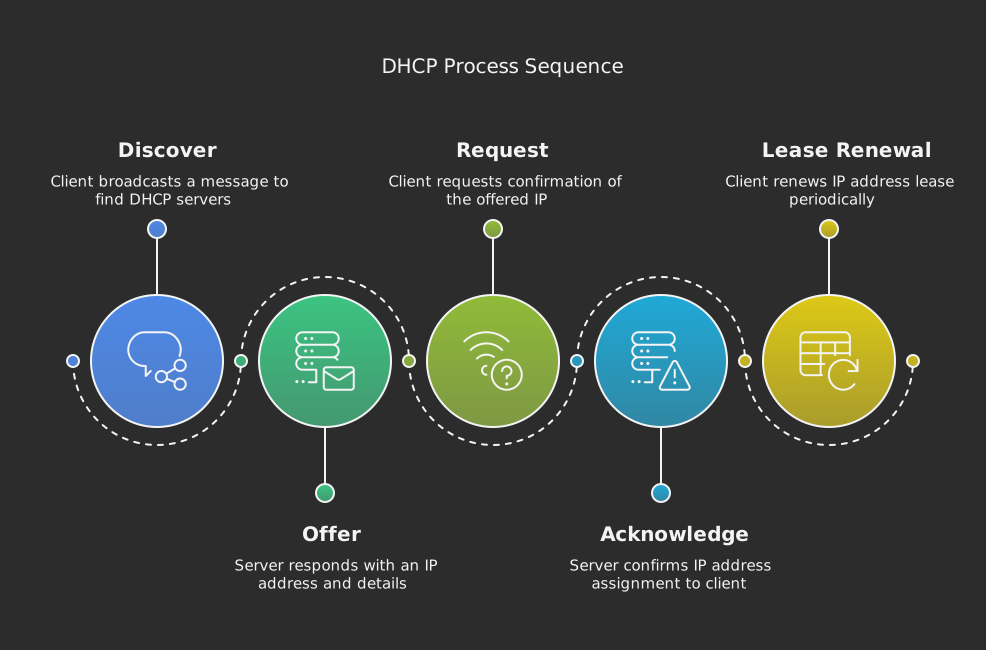
DHCP handles:
- Automatic IP address assignment
- Network configuration distribution
- IP address management and lease time
- Conflict prevention in network addressing
Why These Services Matter
Without DNS
- You’d need to remember IP addresses for every website
- No easy way to change server locations
- Difficult to manage web services
Without DHCP
- Manual network configuration required
- Higher chance of address conflicts
- More complex network management
- Difficult to move between networks
Hands-On Practice
Try these commands to see DNS and DHCP in action:
# View your DHCP-assigned IP configuration
ipconfig /all

# Look up DNS information for a domain
nslookup google.com
💡 Practice Tip
Try these commands on your computer to see your actual network configuration and DNS resolution in action.
Common Issues and Solutions
DNS Issues
- Cannot resolve website names
- Slow website loading
- “DNS Server Not Responding” errors
DHCP Issues
- “No Valid IP Configuration”
- Limited or no network access
- IP address conflicts
Next Steps
- Start with DNS Basics to understand how domain names work
- Continue to DHCP Basics to learn about network configuration
- Try the hands-on exercises in each section
Additional Resources
- Network troubleshooting guide
- Common networking commands
- Command Cheatsheet