Internet & Computer Basics
Understanding how devices connect to the internet and how data travels across networks.
Table of contents
- What is the Internet?
- Basic Internet Diagram
- Basic Network Components
- Hands-On Demonstration
- Understanding Web Addresses
- Introduction to Computer Hardware
- Next Steps
- Additional Resources
What is the Internet?
The internet is essentially a network of networks - a vast system that connects computers and devices worldwide. When you type a website into your browser, your device sends a request through this network to retrieve the information you want.
The Internet vs. The Web
Many people use the terms “internet” and “web” interchangeably, but they’re actually different:
- The Internet: The physical infrastructure of interconnected networks
- The World Wide Web: A service that runs on the internet, using HTTP protocol and web browsers
Other internet services include email, file transfers (FTP), messaging, and more.
Basic Internet Diagram
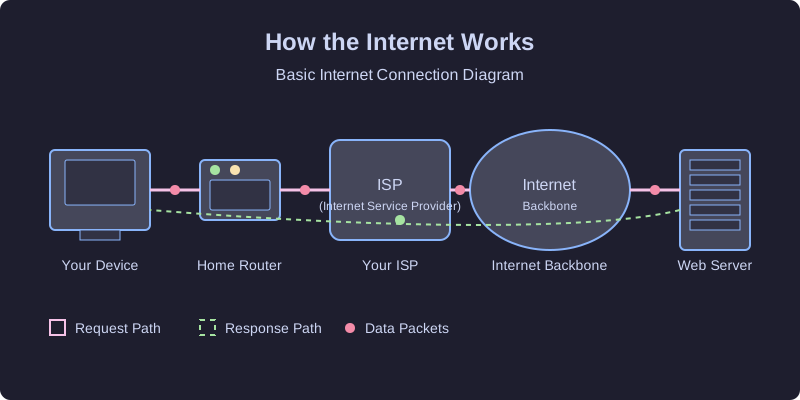
When you connect to the internet, your data follows this basic path:
- Your Device → Local Network: Your computer connects to your home router
- Local Network → ISP: Your router connects to your Internet Service Provider
- ISP → Internet Backbone: Your ISP connects to larger networks
- Internet Backbone → Destination Server: Data travels to the server hosting the website
- Server → Back to You: The server sends the requested information back through the same path
Basic Network Components
Client Devices
- Computers: Desktops and laptops
- Smartphones: Mobile devices with internet capabilities
- Tablets: Portable touchscreen devices
- Smart devices (IoT): Internet-connected appliances, sensors, etc.
Network Infrastructure
- Routers: Direct traffic between networks
- Switches: Connect devices within a network
- Modems: Convert signals between your home and ISP
- Cables and wireless signals: Physical and wireless transmission media
Servers
- Web servers: Host websites and web applications
- Email servers: Process and store email messages
- File servers: Store and serve files
- Database servers: Store and retrieve structured data
Hands-On Demonstration
Let’s try a simple command to see how data travels across the internet:
ping google.com
This command shows:
- If you can reach a website
- How long it takes (in milliseconds)
- If any data packets are lost
What’s Happening Behind the Scenes
When you run the ping command:
- Your computer looks up the IP address for google.com (using DNS)
- It sends small data packets to that IP address
- It waits for a response from the server
- It measures how long the round trip takes
- It reports the results to you
Understanding Web Addresses
When you type a web address (URL) like www.example.com:
- Your browser needs to find the server’s actual address (IP address)
- It uses DNS (Domain Name System) to look this up
- Once found, it can request the webpage
Anatomy of a URL
A typical URL (Uniform Resource Locator) has several parts:
- Protocol:
https://(secure web protocol) - Domain:
www.example.com(the website name) - Path:
/products/item1(specific location on the site) - Parameters:
?color=blue&size=large(additional information)
Introduction to Computer Hardware
While we’ll cover computer hardware in more detail later, it’s important to understand the basic components that enable internet connectivity:
- CPU (Central Processing Unit): The “brain” that processes instructions
- RAM (Random Access Memory): Short-term memory for active processes
- Network Interface Card: Hardware that connects to networks
- Storage: Where your files and programs are kept
Next Steps
Continue to How the Internet Works for a deeper dive into internet protocols and communication methods.