Email Troubleshooting
A practical guide to diagnosing and fixing common email issues.
Table of contents
- Common Email Problems
- Authentication Issues
- Delivery Problems
- Performance Issues
- Advanced Diagnostics
- Best Practices
- When to Seek Help
- Additional Resources
Common Email Problems
❗ Before You Start
Always verify your internet connection is working before troubleshooting email-specific issues.
1. Cannot Send Emails
Symptoms:
- “Message failed to send” errors
- Emails stuck in outbox
- SMTP connection errors
Diagnostic Steps:
# Check SMTP server availability
ping smtp.gmail.com

# Verify DNS resolution
nslookup smtp.gmail.com

# Test email server ports
telnet smtp.gmail.com 587
Common Solutions:
- Verify SMTP server settings
- Check username/password
- Confirm port numbers (25, 587, 465)
- Update SSL/TLS settings
2. Cannot Receive Emails
Symptoms:
- Missing expected emails
- Delayed reception
- Incomplete synchronization
Diagnostic Steps:
# Check mail server records
nslookup -type=mx yourdomain.com

# Verify server response
telnet pop.gmail.com 995
Common Solutions:
- Check POP3/IMAP settings
- Verify storage space
- Clear local cache
- Update email client
Authentication Issues
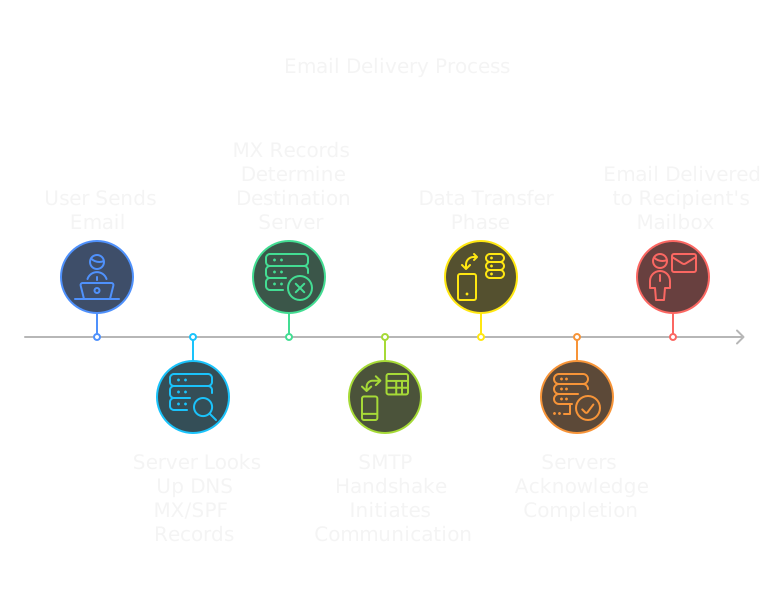
1. SPF Failures
Check SPF Records:
# View SPF record
nslookup -type=txt domain.com
Common Issues:
- Missing SPF record
- Incorrect server IP in record
- Syntax errors in SPF
- Too many DNS lookups
2. DKIM Problems
Verify DKIM:
- Check DKIM signature in headers
- Validate key rotation
- Confirm DNS records
💡 DKIM Tip
Most email clients can show you the DKIM signature status in the email headers.
3. DMARC Issues
Check DMARC Policy:
# View DMARC record
nslookup -type=txt _dmarc.domain.com
Troubleshooting Steps:
- Verify DMARC record exists
- Check policy syntax
- Review alignment with SPF/DKIM
- Monitor DMARC reports
Delivery Problems
1. Bounced Emails
Types of Bounces:
- Hard bounces (permanent)
- Soft bounces (temporary)
- Delayed delivery notices
Common Causes:
- Invalid recipient address
- Server rejection
- Full mailbox
- Policy violation
2. Spam Filter Issues
If Emails Go to Spam:
- Check sender reputation
- Review content for triggers
- Verify authentication
- Check IP blacklists
⚠️ Blacklists
Being on an email blacklist can severely impact delivery. Regularly check your IP against major blacklists.
Performance Issues
1. Slow Email Client
Optimization Steps:
- Clear cache
- Compact mailbox
- Remove large attachments
- Update client software
2. Synchronization Problems
IMAP Troubleshooting:
- Check folder settings
- Verify quota usage
- Test connection speed
- Reset sync state
Advanced Diagnostics
Reading Email Headers
Received: from mail-yw1-f41.google.com
    by mx.domain.com with ESMTPS
    id ABC123; Thu, 23 Feb 2024
Authentication-Results: spf=pass dkim=pass
Key Header Fields:
- Received lines (trace route)
- Authentication results
- Message ID
- Date stamps
Network Diagnostics
# Test email server connectivity
telnet smtp.gmail.com 587

# Check DNS resolution
dig +short mx gmail.com

# Verify reverse DNS
nslookup IP_ADDRESS
Best Practices
1. Preventive Measures
- Regular backup of emails
- Update client software
- Monitor storage usage
- Check authentication setup
2. Security Practices
- Enable 2FA
- Use strong passwords
- Keep software updated
- Monitor for unusual activity
3. Maintenance Tasks
- Clean inbox regularly
- Archive old emails
- Update contact lists
- Check spam folder
When to Seek Help
Contact your email provider or IT support when:
- Persistent authentication failures
- Systematic delivery problems
- Security compromises
- Complex configuration issues
📝 Documentation
Always document troubleshooting steps and results for future reference.
Additional Resources
- Email protocol documentation
- Server configuration guides
- Command Cheatsheet
- Authentication setup tutorials